Firstly, if anyone is somehow still following this blog, I apologize for the massive time gap, and thank you so much for following along.
I have published the source code for Kros, in it’s current state, to GitHub under the GNU General Public License 3.0. Check it out here!
Keep in mind that it’s still not complete, or even an operating system yet, but I’m still working on Kros here and there, mostly the Core system that will eventually enable mutliple processes, a core feature of any operating system. I’ll post here if I reach a milestone on that front.
Thanks for reading, and if you haven’t already, please subscribe to the blog.
Also, if you have found this project and posts about its development interesting, please share this website with others like you.
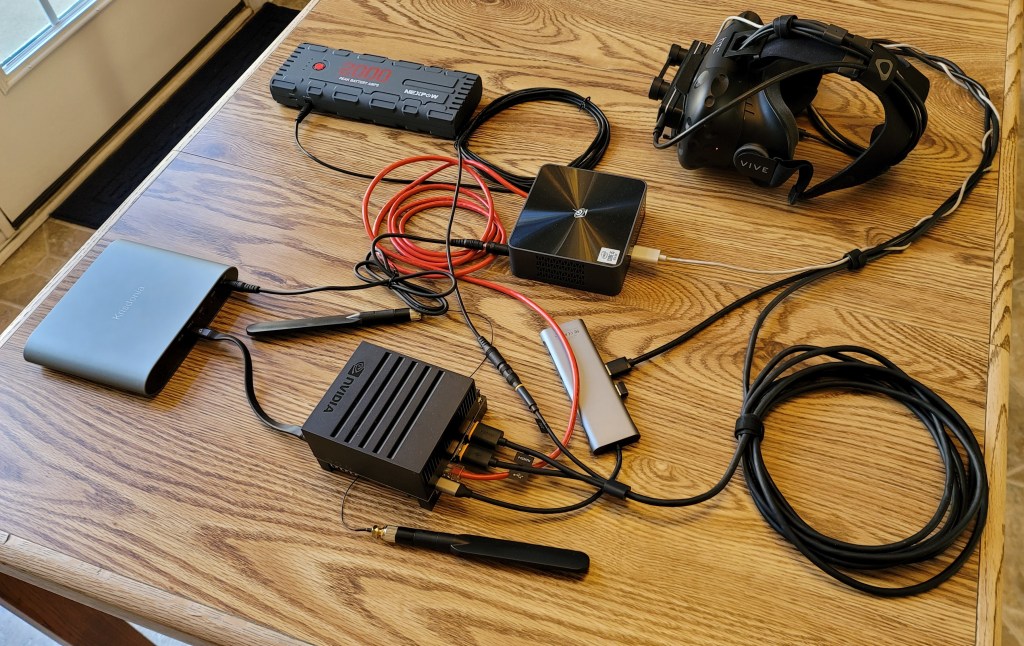
The hardware for the Kros operating system proof-of-concept can now run entirely on batteries, thus making a fully portable system.
Hardware SetupHardware Setup as Seen Through Headset
Many of the tasks related to porting the main code to the Nvidia Jetson have been finished, including fixing user interface bugs and confirming that augmented reality video passthrough still works. The larger goal of increasing the portability of the hardware setup was accomplished by purchasing a Beelink SEI10 Mini PC to act as the hand tracking server (this post explains why a separate machine is necessary) and running everything on two batteries, so having access to an outlet is no longer required for reasonable demonstrations.
Remaining Tasks
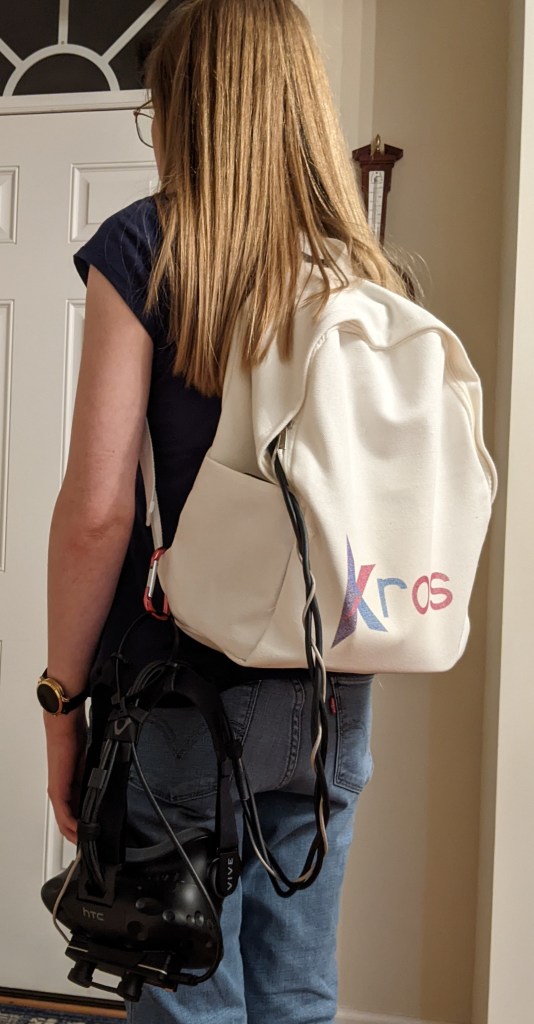
Of course, a collection of loose components needs something to hold it all together, so a well ventilated bag will be put together to contain the hardware that doesn’t go on the user’s head. Additionally, I want to try to improve the frame rate of the proof-of-concept software for smoother performance.
There may be major unforeseen problems ahead, but I’m excited to be within reach of a critical milestone. I hope this is the year I can begin crowdfunding.
Thanks for reading, and if you haven’t already, please subscribe to the blog.
Also, if you have found interest in this project and posts about its development, please share this website with others like you.
It’s my pleasure to announce that VR mode works on the Nvidia Jetson AGX Xavier.
For those interested in the technical reasons this comes so late, I’ll explain briefly. I have been focused on getting Direct Mode, where headset rendering bypasses the desktop window manager, on the Jetson working. This document explains why this is difficult to do on the Jetson’s chip. However, a recent test on the Jetson led me to realize that Extended Mode, where the headset is treated as a regular desktop monitor and rendering is done using a fullscreen window, was an option with the Monado VR runtime engine. I don’t consider the work on Direct Mode for the Jetson time wasted, but perhaps time spent too early for a simple proof of concept.
Remaining Tasks
Not everything is perfect on the Jetson, however. There a few new user interface bugs that exclusively appear on the Jetson. These will need fixing.
The tethered hand tracking works just fine on the Jetson. I still need to make sure the augmented reality video passthrough works too. I foresee no software obstacles to getting that working, but that doesn’t mean there aren’t any.
As I mentioned in my last post, I had planned to switch the hand tracking code to MediaPipe before porting the code to the Nvidia Jetson AGX Xavier. After spending weeks fighting the build system that MediaPipe uses and porting MediaPipe’s Python hand tracking solution API to C++, I successfully implemented MediaPipe as a hand tracking option near the end of August. Unfortunately, the result was not as high quality as I had hoped.
So, having experienced MediaPipe’s hand tracking as a method of input, I have decided to continue using Leap Motion for the current proof of concept.
This blog post will answer the following questions:
Why doesn’t MediaPipe work as well as Leap Motion?
How am I going to continue using Leap Motion without tethering to a Windows machine?
Can an open source solution like MediaPipe be made to work in the future?
MediaPipe, as currently implemented
The MediaPipe hand tracking solution takes a single image and outputs a nominally 3D point per joint including fingertips. The X and Y values together make a point on the image on a scale from 0 to 1, but the Z value is the depth relative to the wrist of that hand with a poorly documented relative scale.
So, by itself, MediaPipe can’t give an absolute position in space. In fact, without knowing the size of the hand, it is impossible. However, by calculating the hand tracking image points for each eye of the stereo camera, it is possible to triangulate the absolute positions in space if the camera’s optical properties are known.
This is how Kros currently uses MediaPipe. Unfortunately, this means that if there is a tracking failure in either camera, the product of the stereo calculation is ruined. Potential tracking failures include:
Failing to recognize a hand at all.
Misidentifying an object as a hand.
Correctly locating the joints of a hand, but identifying the hand as the wrong hand facing the wrong way (e.g. the back of a right hand can get mislabeled as the palm of a left hand).
The rate these failures occur, combined with stereo triangulation requiring double the reliability, prevents Kros’s MediaPipe implementation from being usable. To be clear, for an open source piece of software, MediaPipe’s hand tracking is impressive, but I need a solution that’s more reliable.
Leap Motion
I must give credit to the Leap Motion team. The Leap Motion Orion hand tracking works spectacularly, and comparing it to MediaPipe’s hand tracking makes that clear. However, the issues with using Leap Motion have not changed.
The Leap Motion driver can’t be run on the Nvidia Jetson directly, but the final proof-of-concept for the crowdfunding can’t be tethered to giant Windows machine if I want backers to see what a Kros computer can really do. What’s the solution? Have the final proof-of-concept for the crowdfunding be tethered to a tiny Windows machine. There appear to be mini-PCs that are roughly the same scale as the Nvidia Jetson that have the specifications needed to serve as the hand tracking server. At least, that’s the plan.
For now, I’ll continue tethering to a separate Windows laptop and resume work on the other issues that need fixing. Perhaps during that time, the situation may change.
Future Solutions
Long term, Leap Motion still has two big problems:
Tethering to a Windows machine of any size is not an acceptable requirement for a commercially sold wearable computer.
The license puts restrictions on commercial use that would hamper Kros as a released product without a direct agreement with Ultraleap (the company that owns Leap Motion).
The situation could change by the time the crowdfunding starts, but it’s still good to talk about future solutions that don’t depend on closed source software or vendor-specific camera hardware. With talented software developers employed, potential fixes to Kros’s MediaPipe implementation could include:
Improving MediaPipe itself.
Filtering the results using an algorithm like a Kalman filter.
Doing a one-time calculation of hand sizes using stereo triangulation, so that absolute space positions can be calculated from just one camera eye image if that’s all that’s available.
While I’m disappointed by the failure to resolve the long-term issues with the hand tracking, I can now move forward and hopefully make progress on other fronts. The next post will probably relate to getting VR mode working on the Nvidia Jetson AGX Xavier.
Thanks for reading, and if you haven’t already, subscribe to the blog.
I mentioned in the first post that there were three major tasks remaining to complete the proof-of-concept:
Improve performance by overhauling the 3D UI layout engine.
Finish porting the code to the Nvidia Jetson AGX Xavier, which I’m using as the computer unit of my portable computer for my proof-of-concept.
Switch to hand tracking code running locally on the Jetson to fulfill the promise of a truly untethered XR solution.
The performance improvement was completed in April, as it was critical for the demo video I last posted. The remaining two goals still need to be implemented, but I’ve decided that it makes more sense to switch the hand tracking code first, so that’s what I’ve been working on recently.
Currently, the project uses the Leap Motion device to do hand tracking, with the actual hand tracking code running on a tethered second computer. This is because the better versions of the Leap Motion driver do not run on Linux and do not run on the same processor architecture that the Nvidia Jetson uses. Unfortunately, having to be tethered to a traditional PC doesn’t make for a good proof-of-concept that’s intended to be portable. So, I needed to find a hand tracking solution that would run on the same device as the rest of Kros.
Thankfully, I came across Google’s MediaPipe, a toolkit that includes a hand tracking solution, which offers several advantages:
It is free for commercial use.
It is open source, so it can be ported to any operating system and processor architecture including the Jetson’s.
It can use any basic camera, so, instead of a special device, it can use the same camera used for video passthrough.
If you’re interested in MediaPipe, you can try out its single-hand tracking demo within your web browser by going to https://viz.mediapipe.dev/demo/hand_tracking and clicking the run button in the upper right corner to track your hand in front of your web camera.
Although the integration of MediaPipe’s build process into Kros’s build process has been more vexing than I initially anticipated, I have made progress on this task and hope to complete it by the end of the summer. At that time, I’ll provide more details on the switch and any changes to the hand tracking functionality.
Thanks for reading, and if you haven’t already, subscribe to the blog.
In modern times, almost all software depends on other software. So in this more technical post, I’ll talk about the software used by Kros’s proof-of-concept, focusing on what I think are the biggest pieces that will continue to remain an important part of Kros as it evolves.
Linux
Every operating system needs a kernel to handle low level functions like process management and interprocess communications, and Linux is one of the most widely used open source kernels in the world. In fact, the Android operating system uses a modified Linux kernel.
The Kros proof-of-concept application is a Linux application that I’ve developed and tested almost exclusively on Arch Linux, which is my preferred Linux distribution. Kros successfully compiles and runs on Ubuntu as well.
Ultimately, even once Kros becomes a full operating system, it will continue to use the Linux kernel. At that point, however, Kros won’t be a Linux distribution like Ubuntu or Arch Linux. In fact, the API for developing Kros applications will be kernel-independent to leave open the possibility of switching to an alternative kernel (like Zircon) in the future.
OpenXR and Monado
OpenXR is an open API developed by the Khronos group, the same entity responsible for the widely-used graphics APIs OpenGL and Vulkan. Kros currently uses OpenXR for interacting with mixed reality hardware. As a result, Monado, which is the OpenXR runtime for Linux, is used for running Kros.
As Kros evolves into an independent operating system, it will need to provide its own mixed reality hardware interface to application developers, enabling them to write immersive Kros applications using OpenXR similar to the way Monado enables them to write Linux XR applications using OpenXR. In a way, the roles of Kros and OpenXR will be reversed with Kros hosting an OpenXR implementation rather than depending on it. Thankfully, Monado is open source, so Kros will be able to reuse its code.
OGRE
OGRE is an open source 3D rendering engine. Unlike popular engines like Unreal and Unity, OGRE is strictly a 3D rendering engine and not a game engine.
The Kros demo uses OGRE for rendering the 3D user interface and for the 3D virtual reality demo game. Any other services offered by complete game engines would either be excessive or made redundant by Kros’s internal services, so an engine dedicated exclusively to 3D rendering is exactly what is needed.
While Kros may continue to use OGRE for the user interface layer, immersive application developers should be free to use any rendering engine or game engine that supports the OpenGL or Vulkan graphics APIs.
Open Source
All of these big pieces are open source. That’s because Kros itself will be open source so there is a strong preference for its dependencies to also be open source. Even in cases where proprietary software is being used, such as the Leap Motion hand tracking, the idea is to eventually either utilize such software through open APIs (for example, graphics drivers via Vulkan) or remove such software in favor of open alternatives.
Thanks for reading, and if you haven’t already, subscribe to the blog.
As the Kros Operating System is being created specifically to unlock the full potential of mixed reality (VR and AR) hardware, I thought it might be appropriate to discuss the hardware – specifically what I’ve used for the development process, what else will work with Kros, and what happens as the hardware advances.
My Hardware Setup
I’ve been using the following mixed reality equipment for developing the Kros proof-of-concept:
As part of the process of making my setup portable, I’ll be adding the Nvidia Jetson AGX Xavier as the portable computer unit. In addition, though the Leap Motion has worked well, I’ll be switching to a hand tracking system that only requires the Zed Mini camera for reasons I’ll cover in a future post.
Along the way, I also tried two small individual cameras which worked well for augmented reality, but I found that using the Zed Mini resulted in easier stereo calibration.
Target Hardware
My intention with Kros is to make an operating system for a specific purpose – to facilitate mixed reality computing – not for a specific set of hardware. As a result, the Kros system is just software and not hardware, and while we may offer some hardware products (such as developer kits), Kros aims to be completely hardware vendor neutral.
For a computer to run Kros, it needs:
sufficient computing power
a headset that provides AR and pure VR
a headset mounted camera
hand tracking
Those requirements can be met in various ways, such as:
a VR headset with a mounted stereo camera for AR passthrough and hand tracking
a VR headset that can turn on optical passthrough, with a mounted camera, plus hand tracking gloves
Kros will try to support any hardware configuration that satisfies the minimum functionality and has the drivers. I believe that many of the currently available VR and AR hardware components could be incorporated into such a setup.
Advantages
Kros’s hardware vendor neutrality produces several advantages. To begin with, it will foster a competitive hardware landscape. Users with different systems will be able to use Kros, and applications developed for Kros will be able to run on most of those systems. Users with different budgets and needs will be able to choose the system that works best for them. In addition, Kros will foster innovation going forward since it will be able to incorporate the newest developments in mixed reality that become available regardless of the vendor.
Evolving Together
I expect that VR and AR hardware will improve dramatically in the coming years, and it’s my intention that Kros will be updated to take full advantage of advances as they occur. Potential areas of improvement include the display and hand tracking. But whatever form these improvements take, the new computer experience that’s possible with Kros and mixed reality hardware will only get better.
Thanks for reading, and if you haven’t already, subscribe to the blog.
For the past week I’ve been working on restructuring the widget layout process in preparation for work on improving the performance which is the first of the three remaining major tasks mentioned in the introductory post. But rather than delving into the details of that restructuring, since widgets (such as buttons, sliders, and text fields) are part of the user interface, I think it would be more informative to give an overview of what makes the Kros user experience different.
The Kros User Experience
The primary objective of Kros is to enable the full potential of a portable device with a 3-dimensional mixed reality user interface. The advantages that such a system could provide are plentiful.
A 3D interface with a portable device provides an order of magnitude more space for computing activities. With a smart phone, tablet, or a traditional monitor (even a very large one), the amount of your field of view that you can actually take advantage of is relatively small. With Kros, you could have 360 degrees of screen space, and not just horizontally, but vertically too. So there’s no more need to shuffle windows around or change focus. You just interact.
A mixed reality user interface in 3 dimensions allows for more natural approaches to user input which are, well, naturally easier to use and also more enjoyable. To perform most tasks in Kros, the user’s hands directly push buttons, grab windows, and so forth without the need for an intermediate device such as a mouse. As much as possible, Kros’s virtual objects behave like the corresponding real objects, providing visual and spatial feedback for user actions. Thus, when you as the user press a Kros button, you see the button moving as your finger depresses it – just like a real button. And in most activities, whether work or play, you would use your hands in a natural way to carry out actions. For example, when playing a sword fighting game, you could hold your virtual sword with your real hand as you fight your virtual opponent.
In addition, a mixed reality user interface in 3 dimensions can provide immersive experiences. For instance, with a 3D painting/sculpting program running on Kros, you could use your hands to choose colors, then apply them in 3 dimensions as you move freely around a virtual object you’re creating. You could do this in augmented reality within your own living room or office or in full virtual reality where you might paint while standing on the rim of a virtual Grand Canyon or sculpt from beside the Trevi Fountain in a virtual Rome. The possibilities for experiencing new places or activities are almost limitless.
With these advantages – more usable space, more natural approaches to user input, and a more immersive experience – together with portability, Kros can unlock exciting new possibilities for computing.
So stay tuned, and if you haven’t already, subscribe to the blog.



 Kros Development Log